



| Quick Answer How to use social media for customer service in one paragraph: treat every comment and DM as a support ticket. Acknowledge publicly within one hour during business hours, move the details to a private message, fix the problem, then close the loop in public so other customers can see it was handled. Write templates as starting points rather than scripts, set clear escalation rules for refunds, safety issues and abuse, and track social complaints alongside your Google and Yelp reviews because the same unhappy customer usually shows up in both places. |
Most small businesses did not choose social media as a support channel. Customers chose it for them. Someone orders, something goes wrong, and instead of finding your support email they type a complaint under your latest Instagram post because that is the tab they already have open. If your social media strategy only covers what to post and not how to answer, you are running half a channel.
Table of Contents
This guide is the practical answer to how to use social media for customer service, written for businesses already getting support queries in DMs and comments. It covers what customers actually expect in response time, when to reply in public and when to take it to DM, response templates that do not read like a bot wrote them, escalation rules for the customers who are genuinely angry, and the overlap with review sites that most businesses ignore until a one star review appears. It builds on the social media best practices we already recommend and goes deeper on the support side.
Customers expect answers where they already are
The honest reason social customer service matters is not that it is trendy. It is that the complaint is already public. An unanswered email is invisible. An unanswered comment under your post is visible to every person who scrolls past it, and it stays there. Silence reads as “this business does not care” even when the real reason is that nobody on your team checks Instagram on weekends.
There is a second reason. People who complain on social media are usually not your angriest customers. They are your most engaged ones. They follow you, they bought from you, and they still think you might fix it. That is a customer worth keeping, and the way you handle the next twenty minutes decides whether they stay.
Social customer support does not mean is that you must be on every platform answering everything. Pick the two platforms where your customers actually message you (for most local businesses that is Instagram and Facebook, sometimes WhatsApp), turn on notifications for those, and be honest in your bio about where you answer fastest.
Response time: the expectation data
Industry surveys from Sprout Social, HubSpot and others have said the same thing for years: the majority of consumers expect a reply on social media within 24 hours, and a meaningful share expect one within the hour. Many businesses take days or never reply at all. The gap between expectation and reality is the whole opportunity, because a business that answers in an hour looks exceptional simply by showing up.
Below are the response time targets we set for the client inboxes we manage. They are targets for a first human acknowledgement, not for a full resolution. “We are looking into this now” within the hour buys you the rest of the day to actually fix it.
Table 1: Recommended first response targets by channel (business hours)
| Channel | Target for first human reply | Why this target |
|---|---|---|
| Public comment on a post | Under 1 hour | Visible to everyone; silence is public |
| Instagram or Facebook DM | Under 1 hour | Meta shows your response rate to customers |
| WhatsApp Business | Under 30 minutes | Customers treat it like texting a friend |
| Mention or tag in a Story | Under 2 hours | Stories expire in 24 hours, so does the goodwill |
| X (Twitter) mention | Under 1 hour | Fastest moving public channel |
| Outside business hours | Next morning, first thing | State your hours in the bio so nobody waits blind |
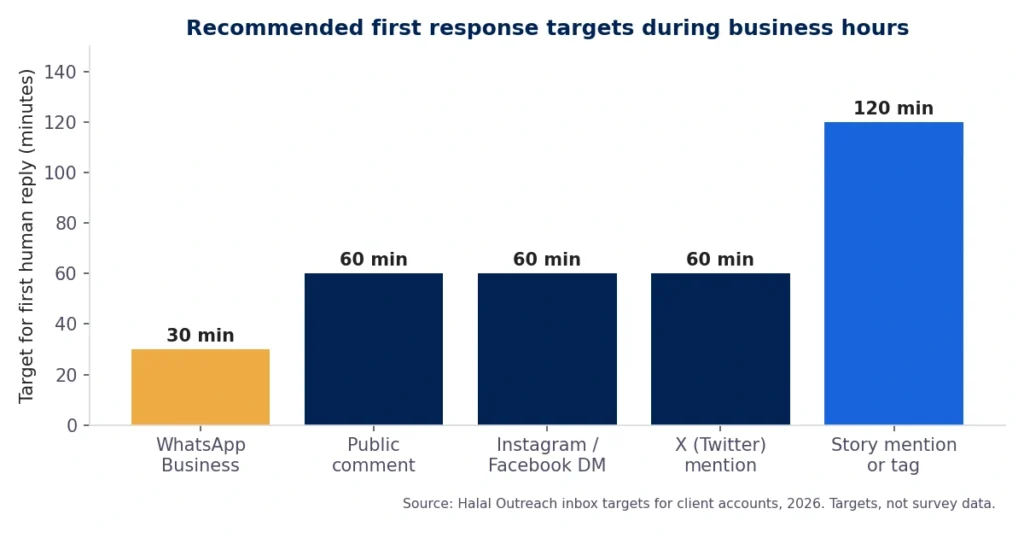
Figure 1: First response targets in minutes by channel
Two honest caveats. First, if you cannot staff these hours, say so in your bio and pinned post. “We reply Monday to Saturday, 9am to 7pm” beats a customer waiting all Sunday wondering if you exist. Second, an auto reply that says “Thanks for your message, we will get back to you” does not count as a response. Customers know the difference, and platforms like Meta measure your real response rate anyway.
Public reply, private resolution
The most common question we get is whether to respond to complaints online in public or move straight to DM. The answer is both, in that order. Reply once in public so everyone watching sees you acknowledged it, then move the details private, then come back to the public thread when it is solved.
Reply in public first because the audience for a public complaint is not the complainer. It is the fifty people who will read that thread before deciding whether to order. They do not need to see you win the argument. They need to see you respond quickly and calmly. Move to DM because resolving anything real requires an order number, a phone number or a photo of the damaged item, and none of that belongs in a comment thread. Close the loop in public because a thread that ends with “Please DM us” looks unresolved. A thread that ends with “Glad we could sort this out, enjoy the replacement” is free marketing.
Table 2: Public reply vs private message: what goes where
| Situation | Public reply | Private message (DM) |
|---|---|---|
| First acknowledgement of a complaint | Yes, always | Follow immediately after |
| Order numbers, phone numbers, addresses | Never | Yes |
| Photos of damaged or wrong items | Never | Yes |
| Refund or replacement details | No | Yes |
| Final confirmation that it was fixed | Yes, close the loop | Also thank them here |
| Safety, allergen, harassment, legal threat | One line only, then move | Yes, and escalate |
| General questions (hours, pricing, availability) | Yes, others benefit | Only if personal |
The one exception is anything involving safety, allergens, harassment or a legal threat. Those go private immediately and get escalated, which is covered further down.
Response templates that do not sound robotic
Templates are useful because at 6pm on a Friday nobody writes their best reply from scratch. Templates are dangerous because customers can smell a paste job, and a pasted apology under a real complaint makes things worse. The fix is to template the structure, not the words. Every reply should have four parts: use their name, name the specific problem, say what happens next, and give a time. Then write the actual sentences fresh each time.
Here are the five templates we use most, written as skeletons. The words in square brackets are the parts that must change every single time.
Table 3: Five response templates with the parts that must change every time
| Situation | Template skeleton |
|---|---|
| Public acknowledgement | Hi [name], sorry about [specific problem]. That is not what we want for you. I have sent you a message so we can sort it out today. |
| DM opener | Hi [name], thanks for letting us know about [specific problem]. Can you send me [order number / photo / date] so I can check what happened? I will come back to you by [time]. |
| Delay update | Hi [name], quick update: [what you found]. [What happens next] will be done by [time]. Thank you for your patience while we fix this. |
| Resolution | Hi [name], [what was done] is sorted. [Specific detail, for example the replacement ships tomorrow]. If anything else is not right, message me directly. |
| Public close | Glad we could fix [the issue] for you, [name]. Thanks for giving us the chance to make it right. |
Notice what is missing: “We apologize for any inconvenience.” That phrase has been used so often that it now signals the opposite of an apology. Say sorry in plain words or say nothing and just fix it. Also missing: emojis in complaint replies. Save those for the thank you messages. If you need guidance on what your team is and is not allowed to say, that belongs in a written social media policy guide rather than in each person’s head.
Escalation rules for the angry ones
Most complaints are mild. A late delivery, a wrong item, a question that was ignored. The person answering your inbox should handle those without asking anyone. The problem is the other five percent, where an inexperienced team member either overpromises a refund they cannot authorize or gets defensive and makes a small problem public and large. Escalation rules exist so that person never has to guess.
Write your rules down in one page and put it where the inbox is managed. Ours for most clients looks like this.
Table 4: Escalation rules for the inbox
| Trigger | Who handles it | Response deadline |
|---|---|---|
| Late order, wrong item, general question | Inbox person, no approval needed | 1 hour |
| Refund or replacement under the set limit | Inbox person, log it | Same day |
| Refund above the limit | Owner or manager | Same day |
| Safety, allergen or injury claim | Owner immediately, private only | 15 minutes |
| Threat, abuse or harassment | Owner; document, do not engage | 30 minutes |
| Journalist, influencer or large account | Owner before any reply | 30 minutes |
| Same customer, third complaint | Owner calls the customer | Same day |
| Any mention of lawyer or legal action | Owner; one holding reply, nothing more | 1 hour |
Two rules that matter more than the table. Never argue in public, even when the customer is factually wrong. You will not win, and the audience is not scoring the debate. And never delete a complaint unless it breaks platform rules or your posted community guidelines. Deleted complaints come back as screenshots with the caption “they deleted my comment,” and that is a worse story than the original problem.
The complaint that becomes marketing
There is a version of a complaint that ends up doing more for your business than a paid post. It goes like this: a customer complains publicly, you answer fast and fix it properly, and the customer replies saying so. Other people see the whole arc. What they take away is not “this business makes mistakes.” Every business makes mistakes. They take away “this business fixes them,” which is the single most reassuring thing a new customer can learn before ordering.
You cannot manufacture this, and you should not fake it with planted complaints. What you can do is ask. Once a problem is genuinely fixed and the customer is happy, ask if they would mind saying so in the thread, and ask if they would leave a review. That second ask is where social support and getting more Google reviews connect. The customer who was upset on Tuesday and delighted on Wednesday writes the most convincing review you will ever get, because it has a story in it.
This is also where review sites overlap with your inbox. The same customer who DMs you on Instagram will often post the same complaint on Google or Yelp an hour later if the DM goes unanswered. Check both. When you resolve something on social, search your reviews for the same name or issue and respond there too, in the same tone. Two different answers to the same complaint on two different platforms is a credibility problem.
Tools when volume grows
At a handful of messages a day, the native Instagram and Facebook inboxes are fine. Meta Business Suite combines both for free and lets more than one person answer, which is the first real upgrade most businesses need. The trouble starts when you are getting thirty or more messages a day across three platforms and nobody knows what has been answered.
At that point a shared inbox tool earns its cost. Sprout Social, Hootsuite Inbox, Zoho Social and Agorapulse all do roughly the same job: pull every comment, DM and mention into one queue, let you assign them, tag them (complaint, question, praise), set response time alerts, and report on how fast you actually replied. Pick on price and on which platforms it supports, not on features you will not use. Honestly, most businesses under ten staff never need this and are better off spending the money on an actual person checking the inbox twice a day.
Where it stops being a tool question and starts being a staffing question is when social support is eating three or more hours a day. That is a real job in social customer support, and it is one of the services we offer to businesses that would rather their team spend those hours on the work that brings customers in. If you want us to look at your current inbox and tell you honestly what it needs, we manage inboxes for clients daily and are happy to walk through yours. Call (949) 518 3350.
Frequently Asked Questions
How to use social media for customer service?
Treat comments and DMs as support tickets. Acknowledge publicly within an hour during business hours, move details to a private message, fix the issue, then confirm the fix in the public thread.
What response time do customers expect on social media?
Most expect a reply within 24 hours and many expect one within the hour. Aim for a first human acknowledgement inside one hour during your posted business hours, and state those hours in your bio.
Should I respond to complaints in public or by DM?
Both. Reply once in public so others see you acknowledged it, resolve the details in DM, then close the loop publicly. Safety, allergen, harassment and legal issues go straight to private.
When should a social media complaint be escalated?
Escalate anything involving refunds above your team’s limit, safety or allergen claims, threats, media or influencer accounts, repeated complaints from the same customer, or a legal mention. Everything else the inbox person handles directly.
Do social media complaints affect Google and Yelp reviews? Yes. Customers who are ignored on social often post the same complaint as a review within hours. Answer social quickly, check review sites for the same issue, and respond in both places consistently.