



| Quick Answer Target one primary keyword per page plus three to five secondary variants that share the same search intent. Google does not count keywords. It measures how completely a page covers a topic. One page that owns one topic will outrank one page that chases ten unrelated keywords. If two of your pages target the same primary keyword, they compete with each other. That is keyword cannibalization, and it is the most common reason a site has plenty of content but weak rankings. |
People search how many SEO keywords per page because they want a number. Here is the honest version: there is no magic number, but there is a rule that holds up across every site we have audited. One primary keyword per page, supported by a small group of secondary variants, wrapped inside complete topic coverage. Everything else in this article explains why that rule works and how to apply it without guessing. Before any of this matters, you need a real list of terms to work from, so if you have not done that yet, start with a proper keyword research method and come back.
Table of Contents
The confusion comes from an outdated idea. Ten years ago, people stuffed a page with every phrase they could think of and it sometimes worked. Today that approach actively hurts. Google reads pages the way a person does, looking for the main subject and judging whether the page answers it fully. That is also why the old meta keywords tag stopped mattering, which we covered in detail in how to choose meta keywords for SEO. The signals that count now are the title, the headings, the first hundred words, and the depth of the content itself.
The one primary rule: what it actually means
The one primary rule is simple. Every page gets exactly one primary keyword. That keyword represents the single question or need the page exists to serve. It appears in the title tag, the H1, the URL slug, the first paragraph, and at least one subheading. Not because repetition ranks the page, but because those placements tell both Google and the reader what the page is about within seconds.
Where people go wrong is treating this as a limit on how many keywords the page can rank for. It is not. A page with one clear primary keyword typically ranks for dozens or hundreds of related searches on its own. Ahrefs research has repeatedly shown that a page ranking in the top spot also tends to rank in the top ten for roughly a thousand other closely related queries. You did not target those thousand terms. You covered the topic well, and the rankings followed.
Honest note: if you have been writing pages around a single exact phrase and nothing else, you have been doing half the job. One keyword per page is the starting point, not the finish line.
How many keywords per page by page type
The right count shifts slightly with the type of page, because the job of the page changes. A blog post can go wide inside its topic. A product page has to stay narrow. Use this table as a working reference for keywords per page SEO planning.
| Page type | Primary keywords | Secondary variants | Supporting terms |
|---|---|---|---|
| Blog post or guide | 1 | 3 to 5 | As many as the topic honestly needs |
| Service page | 1 | 2 to 4 | Features, locations, pricing modifiers |
| Product page | 1 | 2 to 3 | Specs, model names, use cases |
| Category or collection page | 1 | 3 to 6 | Product types inside the category |
| Homepage | 1 brand or core offer term | 1 to 2 | Trust signals, location, audience |
| Landing page (paid or campaign) | 1 | 1 to 2 | Offer language, matching the ad |
Table 1. Recommended keyword allocation by page type. These are working ranges, not rules from Google.
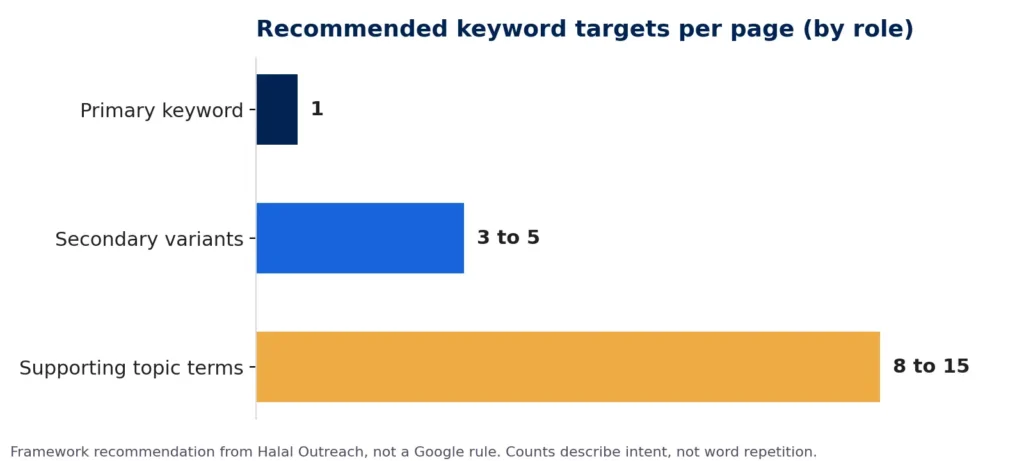
Figure 1. One primary keyword, a small cluster of secondary variants, and a wider set of supporting terms.
Secondary variants: the part most people skip
Secondary variants are the different ways people phrase the same search. For this article, the primary keyword is how many SEO keywords per page. The secondary variants are keywords per page SEO, one keyword per page, and keywords per page. They all point at the same intent. The searcher wants a number and a reason. Because the intent matches, they belong on one page.
Variants are where long tail traffic lives. Individually each one is small. Together they often bring more visits than the head term. If you are not sure which phrasings count as true variants and which are actually different topics, our guide to finding long tail keyword variations walks through the process with Google Keyword Planner.
The test for a secondary variant is intent, not wording. Ask: would the same page fully satisfy someone who typed this? If yes, it is a variant. If the honest answer is that they would need a different page, it is a separate primary keyword and it needs its own page.
Where secondary variants should appear
- In one or two H2 or H3 subheadings, phrased naturally.
- In body text where they fit without forcing the sentence.
- In image alt text when the image genuinely shows that concept.
- In the meta description if there is room after the primary keyword.
- Never all in one paragraph, and never in a list of phrases stacked at the bottom of the page. That pattern is a red flag, not a ranking signal.
Topic coverage beats keyword count
This is the piece that separates pages that rank from pages that sit on page three. Google evaluates whether a page covers a topic completely. It looks at the subtopics a searcher would expect, the questions they would naturally ask next, and whether the page answers them. That is what SEO optimization actually means in practice. Keyword placement gets you noticed. Topic coverage gets you ranked.
For this article, topic coverage means explaining the one primary rule, defining secondary variants, showing how many keywords by page type, covering keyword mapping, and warning about cannibalization. A version of this page that only repeated the phrase how many SEO keywords per page eight times and stopped there would lose to this one every time.
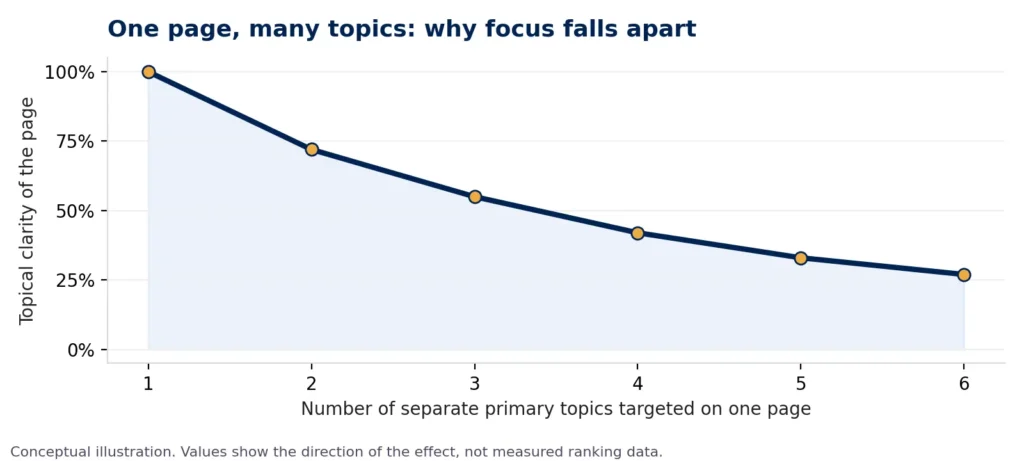
Figure 2. Adding a second, third, or fourth unrelated topic to one page dilutes what the page is about. Split them.
Keyword mapping: assign before you write
Keyword mapping is the habit that prevents most keyword problems before they start. It is a simple sheet where every target keyword is assigned to exactly one URL. Before writing anything new, you check the map. If the keyword is already assigned, you improve that page instead of creating a competitor to it.
| Keyword | Search intent | Assigned page | Role on that page |
|---|---|---|---|
| how many seo keywords per page | Informational | This article | Primary |
| keywords per page seo | Informational | This article | Secondary variant |
| one keyword per page | Informational | This article | Secondary variant |
| keyword cannibalization | Informational | Future dedicated article | Primary of a different page |
| how to do keyword research | Informational | Keyword research post | Primary of a different page |
| seo services | Commercial | Services page | Primary of a different page |
Table 2. A keyword map for this section of the Halal Outreach blog. One keyword, one URL, one role.
Notice that keyword cannibalization appears in this article as a supporting term but is mapped to a future page as a primary. That is intentional. This article mentions it because a reader needs the warning. It does not try to be the definitive resource on it, because that would set up the exact conflict the map is designed to prevent.
Keyword cannibalization: when your own pages fight
Keyword cannibalization happens when two or more pages on the same site target the same primary keyword. Google has to pick one, and it often picks neither with confidence. Rankings flip between the URLs, click through rates fall, backlinks split across two pages instead of building one, and neither page reaches its potential. It is one of the quieter causes behind why your pages are not ranking even when the content itself is decent.
| Symptom you will see | What is usually happening | The fix |
|---|---|---|
| Two URLs swap positions for the same query week to week | Google cannot decide which page is the canonical answer | Merge into one page, redirect the weaker URL |
| Several pages rank on page two, none on page one | Authority is split across near duplicate pages | Consolidate and point internal links at one URL |
| A new post outranks an older, better page for a day, then both drop | New page created a competitor instead of an update | Fold new content into the old page, delete the new one |
| Blog post ranks for a keyword the service page should own | Intent mismatch between page types | Refocus the post on informational intent, link it to the service page |
Table 3. Common cannibalization patterns and the practical fix for each.