



| Quick answer To do keyword research for a small business: write down the exact phrases customers use, mine the questions they ask in search suggestions, reviews and emails, expand the list with free tools, sort every keyword by intent before looking at volume, check difficulty by reading the actual search results, and map each surviving keyword to one page. The whole method takes one focused afternoon with free tools, and it beats a subscription tool report because it starts from real customer language instead of a database. |
Keyword research has a reputation as the technical part of SEO, the part that needs a paid tool and a specialist. For a small business that reputation is mostly wrong. The tool gives you numbers; it cannot tell you which searches your actual customers make, and that knowledge is sitting in your inbox and your reviews already. This guide is the research step of our pillar on how to improve SEO, broken into an afternoon of concrete work.
Table of Contents
A promise before we start: everything here runs on free tools, and we will be honest about where free stops being enough. Most of the value lives in the long tail anyway, the specific multi word searches with buyers behind them, which we covered in our piece on long tail keywords with the Google Keyword Tool. Today we build the full method around that idea.
Start from customer language, not tools
Every keyword tool starts from a word you type in, which means the research is only as good as that first word. Small business owners usually type industry vocabulary, and customers do not search in industry vocabulary. A plumber writes repiping; the customer searches water pipe replacement cost. That gap is where most keyword research fails before it starts.
So the first thirty minutes happen away from any tool. Open your sent emails, your review pages, your enquiry forms and your phone notes, and write down the exact phrases real customers used when they described their problem. Ten to twenty phrases in their words, not yours. These are your seed keywords, and they are worth more than any tool export because each one is proof that at least one real buyer thinks in those words.
Question mining: the fastest source of real keywords
Questions are the highest value keywords a small business can target, because a question tells you the intent, the content format and the headline all at once. Question mining means collecting them systematically rather than guessing. The questions you collect also become your future content list, which connects directly to our content marketing tips. Four sources, in order of value:
- Google itself. Type each seed keyword slowly and record every autocomplete suggestion, then open the results and copy the People Also Ask questions. Click two of them and copy the new ones that load.
- Your own inbox and phone. The questions customers ask before buying are the questions future customers are searching. Nobody else has this data.
- Reviews, yours and competitors. Complaints and praise both contain search phrases, written in customer language.
- Community threads. Reddit, Facebook groups and forum threads in your niche are question mines, and the phrasing there is exactly how people type into search.
An hour of this typically produces sixty to a hundred real questions. That is more usable material than most paid tool reports, because every entry came from a human rather than a database estimate.

The difficulty reality check big tools get wrong
Every keyword tool shows a difficulty score, usually zero to a hundred, and small business owners treat it as truth. Here is the honest problem: those scores are built mostly from link metrics, and they routinely mislead in both directions. A keyword scored easy can be owned by huge sites, and a keyword scored hard can have page one results that barely answer the question.
The reality check that actually works takes two minutes per keyword: search it yourself and read page one. You are looking at who ranks and how well they answer. The signals below tell you more than any score:
| What you see on page one | What it means for you |
|---|---|
| Big brands and national sites only | Skip it for now, whatever the difficulty score says |
| Forum threads or Reddit posts ranking | Strong opportunity: Google found nothing better |
| Pages that answer a different question | Strong opportunity: intent mismatch you can fill |
| Thin, outdated or generic pages | Winnable with one genuinely deep page |
| Local competitors with weak pages | Winnable, and worth prioritising this month |
| Exact, thorough, recent answers from strong sites | Real difficulty, park it for later |
The two minute reality check. Reading the live results beats any difficulty score a tool can calculate.
| Intent | The searcher wants | Example | Page that wins | Business value |
|---|---|---|---|---|
| Informational | An answer or explanation | how often should gutters be cleaned | Guide or FAQ post | Builds trust, feeds other pages |
| Commercial | To compare before choosing | gutter cleaning vs gutter guards | Comparison page | High: buyer is close |
| Transactional | To buy or book now | gutter cleaning service near me | Service page | Highest: rank here first |
| Navigational | A specific site or brand | your business name | Homepage | Defend it, nothing more |
Sorting by intent before volume
Volume is the most seductive number in keyword research and the most misleading. A thousand searches from people looking for free information are worth less to your business than thirty searches from people ready to hire someone. So before volume enters the decision, sort every keyword by what the searcher wants, because intent is also how Google decides which pages rank: it shows results matching the dominant intent, and a page fighting the intent of a query does not rank however good it is.
| What you see on page one | What it means for you |
|---|---|
| Big brands and national sites only | Skip it for now, whatever the difficulty score says |
| Forum threads or Reddit posts ranking | Strong opportunity: Google found nothing better |
| Pages that answer a different question | Strong opportunity: intent mismatch you can fill |
| Thin, outdated or generic pages | Winnable with one genuinely deep page |
| Local competitors with weak pages | Winnable, and worth prioritising this month |
| Exact, thorough, recent answers from strong sites | Real difficulty, park it for later |
The two minute reality check. Reading the live results beats any difficulty score a tool can calculate.
The practical rule for a small site: rank your transactional and commercial keywords with service and comparison pages first, and use informational keywords to build the supporting content around them. Chasing high volume informational terms first is the most common ordering mistake we see.
Free tools that are actually enough
For a site under a few hundred pages, free covers the whole method. Paid tools earn their fee at agency scale, when you research hundreds of terms weekly across clients. Until then:
| Intent | The searcher wants | Example | Page that wins | Business value |
|---|---|---|---|---|
| Informational | An answer or explanation | how often should gutters be cleaned | Guide or FAQ post | Builds trust, feeds other pages |
| Commercial | To compare before choosing | gutter cleaning vs gutter guards | Comparison page | High: buyer is close |
| Transactional | To buy or book now | gutter cleaning service near me | Service page | Highest: rank here first |
| Navigational | A specific site or brand | your business name | Homepage | Defend it, nothing more |
| Tool | What it gives you | Honest limit |
|---|---|---|
| Google Autocomplete and People Also Ask | Real questions, real phrasing, updated daily | Manual collection takes time |
| Google Search Console | Keywords you already rank for at positions 8 to 20 | Only works once the site has some history |
| Google Keyword Planner | Volume ranges and related terms, free with an Ads account | Ranges are broad, built for advertisers |
| Google Trends | Whether a term is growing, shrinking or seasonal | No absolute numbers, comparisons only |
| Google Business Profile insights | The searches that surfaced your local listing | Local businesses only |
Notice everything on the list is Google. That is deliberate: you are optimising for Google, so first party data from Google beats third party estimates of Google. The one thing free tools cannot give you is competitor keyword lists, and that is the single honest reason to ever pay for a tool.
Mapping keywords to pages without overlap
This is the step that separates research that changes rankings from research that dies in a spreadsheet. Every keyword that survived the intent sort and the reality check gets assigned to exactly one page: one primary keyword per page, with its close variants and questions supporting it. Two pages targeting the same primary keyword compete with each other, and Google resolves the fight by ranking neither well. Once each page has its assignment, the keyword goes into the places that matter, starting with the title, and our guide on choosing meta keywords and titles covers exactly where. The title also has to earn the click, which is a craft of its own; our piece on making headlines more compelling is the companion read.
Keep the map in a simple sheet with four columns: keyword, intent, assigned page, status. When a new keyword idea arrives next month, the sheet tells you in ten seconds whether a page already owns it or a new page is needed. That single habit prevents the overlap problem permanently.
The one afternoon workflow, start to finish
Here is the whole method as an afternoon, with realistic timings for a first run:
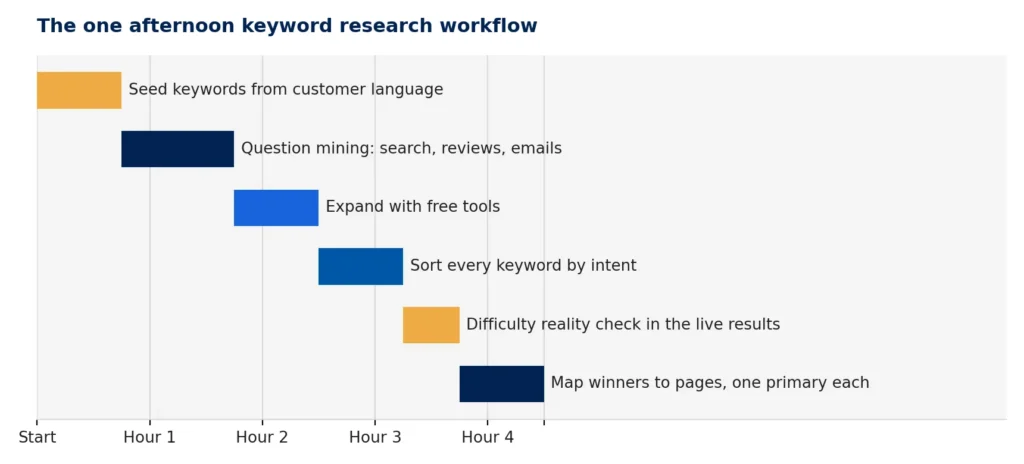
Roughly four and a half focused hours for a first run. Repeat runs take half that, because the seed work is already done.
The output of the afternoon is not a list of keywords. It is a page plan: which pages to improve, which to create, and in what order, each with one primary keyword and a cluster of real questions to answer. That plan is what you execute over the following months, and it is worth more than any report a tool can export.
If you would rather have this done for you, keyword research is built into every SEO engagement we run: same method, plus the competitor data free tools cannot reach. See our services for how an engagement works, or we do this for clients every week, so call (949) 518-3350 and we will tell you whether your site even needs it yet.
Frequently asked questions
How do I do keyword research for a small business?
Start from the phrases real customers use, mine questions from autocomplete, People Also Ask, reviews and your inbox, expand with free Google tools, sort keywords by intent before volume, verify difficulty by reading the live results, and map each keyword to one page. One afternoon covers a small site.
What are seed keywords?
Seed keywords are the starting phrases everything else grows from: the words customers actually use to describe their problem. Pull them from emails, reviews and enquiries rather than industry vocabulary, because tools can only expand what you feed them.
Can I find keywords for my website with free tools only?
Yes, for most small sites. Google Autocomplete, People Also Ask, Search Console, Keyword Planner and Trends together cover discovery, demand and tracking. The only thing free tools cannot show is competitor keyword lists, which is the main honest reason paid tools exist.
How do I know if a keyword is too difficult?
Ignore the tool score and search the keyword yourself. If page one is all national brands with thorough recent answers, park it. If you see forums ranking, outdated pages, or results answering a different question, the keyword is winnable regardless of what the score says.
How many keywords should one page target?
One primary keyword per page, supported by its close variants and related questions. Two pages chasing the same primary keyword compete with each other and usually both lose. Keep a simple keyword to page map so every term has exactly one owner.